Smart Workspace Booking, Right Inside Microsoft Teams
Booking a desk or meeting room shouldn’t mean leaving Teams, opening another app, or clicking through a dozen screens. With the GoBright Teams Chat assistant, it doesn’t. Just send a message; and you’re done.
How the Chat Assistant works
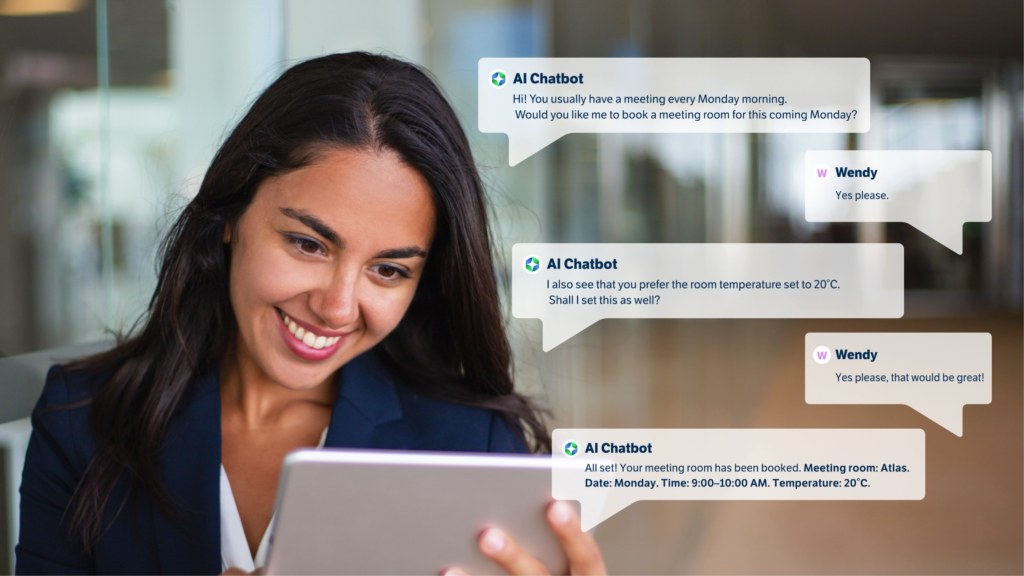
Type something like “Book me a desk tomorrow at 9” or “Is my team in the office on Thursday?” and the AI Chat assistant takes it from there. It understands plain language, asks only what it needs to know, and surfaces available options through clean Adaptive Cards; all without leaving your Teams conversation.
Over time, it gets smarter too. It picks up on your booking habits and starts suggesting spaces, times, and locations that actually match how you work. And because it can show you which colleagues or teams are on-site, planning your week in the office becomes a lot less guesswork.
Why people like AI Chat assistant booking
- Book, change, or cancel in seconds; no app-switching, no searching
- Works the way you talk, not the way a form wants you to type
- Suggests your go-to spots based on past bookings
- Helps you coordinate with your team before you even get to the office
- Clean, consistent interface that anyone can use from day one
- Fewer booking mistakes means less back-and-forth with the helpdesk
Built for the way flexible work actually works
Flexibility is great; but only when the tools supporting it keep up. The GoBright Teams Chat assistant gives employees a faster, more natural way to manage their workspace, while helping organizations make better use of the space they have. Smart AI, seamless Teams integration, and a design that just makes sense.
Want to take part in our Admin AI Chat assistant Pilot Program?
In Q3, the AI Chat assistant will be available to all users.
For admin users, we offer an early access pilot program. Are you an admin user? Sign up here!
Want to know more first?
Our Smart Workplace Experts can show you the feature in action. Or explore the full GoBright product range to see what else is possible.