Hybrid working has transformed how and where we work. At the same time, companies are looking for ways to optimise space, reduce costs, and offer employees more freedom. Traditional office setups—with assigned desks and static floor plans—no longer meet the needs of today’s dynamic organisations. Enter: the flexible workspace. A model that puts adaptability, efficiency and experience first.
What is a flexible workspace?
A flexible workspace is an office environment that allows employees to choose where, when, and how they work, supported by dynamic layouts and smart booking technology.
It’s more than just an open office or a few hot desks. A flexible workspace is a way of designing and managing office environments that suit different working styles, schedules, and team dynamics. It might involve shared desks, part-time office use, coworking areas, or simply smarter use of existing rooms. The key is freedom of choice; combined with the tools to manage that freedom effectively.
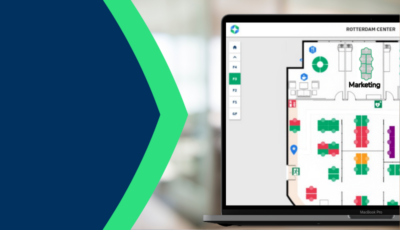
Instead of assigning a permanent spot to each team member, flexible workspaces use technology to support dynamic use. Desk booking systems, digital signage, room scheduling and real-time occupancy data all help make these spaces functional and efficient. They offer structure, without rigidity.
Flexible office spaces as a scalable solution
Business needs evolve. One month you’re hiring, the next you’re consolidating. A flexible office space adapts alongside these changes. By shifting away from fixed desk setups, organisations can reduce unused square meters and use their real estate more strategically. Collaboration zones, quiet areas, meeting rooms and informal breakout spaces can be rearranged—or even rebooked—based on daily needs.
The power lies in visibility and control. With workplace analytics, facility teams can monitor occupancy trends and fine-tune their setup. This not only saves space but enables better investment decisions when it comes to future expansion or reduction.
A flex workspace enhances the employee experience
A well-executed m doesn’t just benefit the bottom line; it also supports employee wellbeing and productivity. When people have access to different types of spaces that match their tasks, they feel more in control of their day. A quiet corner for focus work. A meeting room for collaboration. A desk close to the team. It’s all possible within one smart environment.
In hybrid teams, flexibility also improves connection. Knowing who is in the office, and when—helps people coordinate meetings, reduce no-shows, and avoid frustration. And when space is easy to book and use, it lowers the threshold to actually come in. That’s crucial in today’s landscape where office presence must be earned, not enforced.
Common challenges in flexible workspace environments
Flexibility doesn’t mean chaos. Without a clear framework, a flexible office can quickly become confusing or even inefficient. People might arrive to find no desks available, or book rooms that remain empty due to no-shows. That’s why the transition to flexible working must be guided by structure.
The tools you choose make a big difference. They need to be intuitive, integrated with existing calendars, and easy to adopt for everyone, regardless of tech-savviness. And it’s just as important to consider governance: how do you define desk rules, manage cleaning cycles, ensure data privacy, or track user behaviour without invading it?
IT integration, change management and internal communication are essential parts of the puzzle.
Steps to launch a flexible workspace strategy
Moving toward a more flexible office setup doesn’t have to be overwhelming. Start small, with a clear plan.nBegin by analysing how your current space is used. Which zones are overbooked? Where is there constant availability? Use data to identify pain points and opportunities.
Next, define your goals. Are you looking to cut real estate costs, boost hybrid collaboration, or improve space visibility? Your goals will shape your approach.
Then, choose the right technology partners. Tools like desk booking systems, occupancy sensors, and mapping software form the backbone of a flexible workspace. Make sure they’re scalable, secure, and easy to implement.
From there, it’s all about onboarding and iteration. Train your teams, communicate clearly, and adjust based on usage and feedback. A flexible workspace is never finished—it evolves alongside your people.
Ready to take the first step? Download our implementation checklist to kick-start your flexible workspace journey with structure and confidence. Or reach out to one of our Smart Workplace Consultance