Your team meets every Monday and the project group for the new product every other Thursday. Until now, you could only set up or change these recurring room bookings in Outlook, which is tenious. But from now on, you can create, edit and delete them in GoBright too, one place for every type of booking centralised (and Outlook stays in sync. ofcourse).
What was the challange?
Recurring bookings for integrated rooms showed up in GoBright, but you could only create, change or delete them in Outlook.
Most teams have meetings that repeat: a weekly stand-up, a monthly review, a fortnightly client call. Anyone who wanted to set up a new series, or cancel one, had to switch back to Outlook. That’s one extra step, one extra app and one more reason for people to ask, “Where do I do this again?”
What changes with recurring bookings in GoBright?
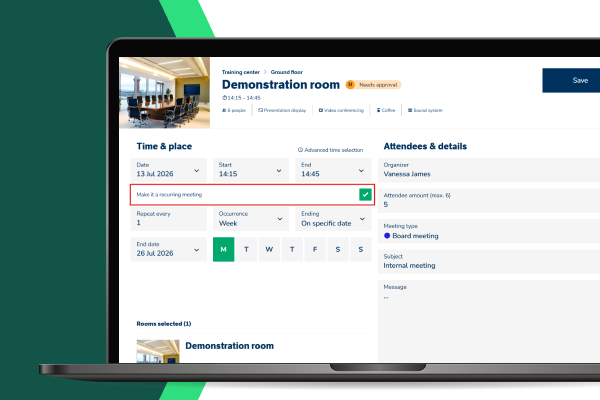
You can now create, edit and delete recurring bookings for integrated rooms directly in the GoBright Platform.
- Create a recurring booking for an integrated room
- Edit a recurring booking, for example a new time or a different room
- Delete a recurring booking you no longer need
Because the rooms are integrated with Outlook, the meeting stays in everyone’s calendar. You no longer need to decide which system to open first; both show the same booking.
Who benefits?
Everyone who books, supports or manages meeting rooms: employees, Smart Office and Workspace Managers, and IT teams. Employees plan their week in one place. They find a room, book it, and set it to repeat without switching apps.
Smart Office and Workspace Managers spend less time explaining which system to use for what. That makes GoBright easier to roll out and easier to adopt. IT teams get one connected system that works the same way, whether a booking starts in Outlook or in GoBright.
How do recurring bookings fit the rest of GoBright?
Recurring bookings follow the same rules as any other GoBright booking.
Room displays show them, and they appear in GoBright Analytics alongside every other booking. So your data on how rooms are used stays complete.
Final thought
Meetings that repeat should be the easiest ones to plan. Now your team sets up a series once, in the app they already use for desks and rooms, and Outlook keeps everyone’s calendar up to date. Want to see how it works for your meeting rooms? Book a free expert consult with one of our Smart Workplace Experts.
FAQs
What is an integrated room?
An integrated room is a meeting room that’s linked to Microsoft Outlook, so bookings made in Outlook and in GoBright appear in both systems and stay in sync.
Can I create a recurring room booking in GoBright?
Yes. For integrated rooms, you can now create recurring bookings directly in GoBright as well as in Outlook. The booking appears in both systems, so attendees see it in their calendars.
Can I edit or delete a recurring booking in GoBright?
Yes. You can edit and delete recurring bookings for integrated rooms in GoBright, without switching to Outlook.
Do recurring bookings in GoBright sync with Outlook?
Yes. Recurring bookings for integrated rooms stay in sync between GoBright and Microsoft Outlook, so organisers and attendees see the same meeting in both.