Pre-registering visitors has long been possible in GoBright via the web portal and the Outlook plugin. Now, this functionality is also available in the mobile app, allowing you to prepare for visitor arrivals from anywhere at your convenience; waiting for the elevator? Add someone during a meeting or a lunch? Adding visitors on the go as easy as sending a text.
How does visitor registration work in the app?
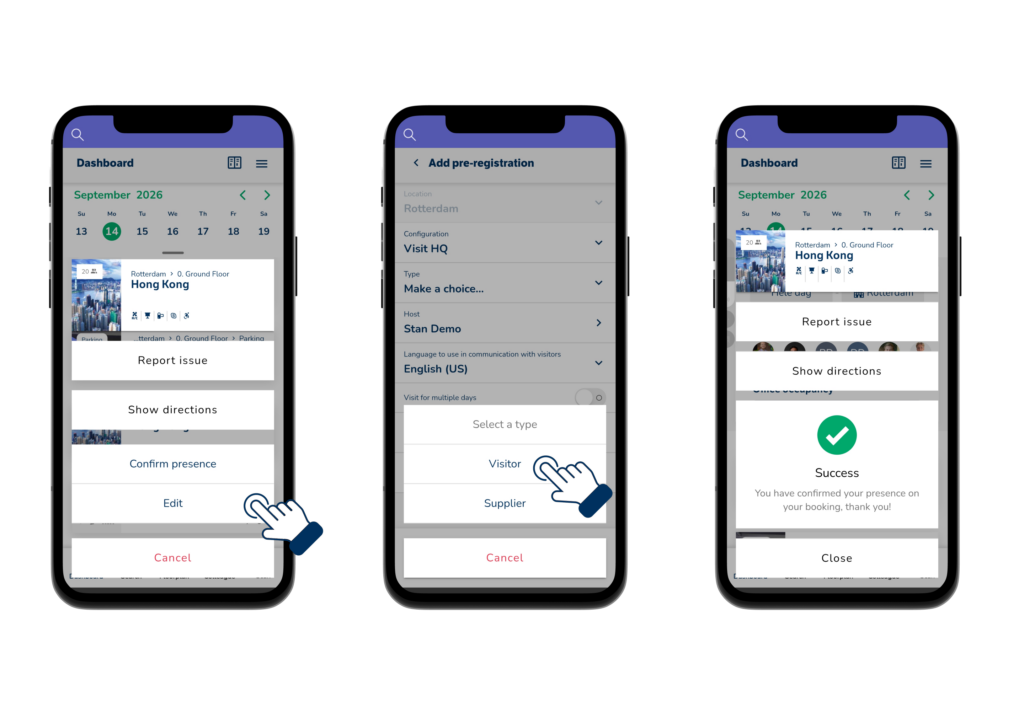
When booking a meeting room in the GoBright mobile app, you can pre-register a visitor as part of the same process. Simply enter the visitor’s details and any relevant instructions, just as you would in the portal or the Outlook plugin.
Prefer to register a visitor independently of a booking? Open ‘My visitors’ in the app menu to add a visitor directly.
‘My visitors’ also provides a daily overview of expected visitors. You can view each visitor’s status and see at a glance whether they have checked in or are waiting at reception.
Why is visitor management in the app important?
Facility teams and workplace managers do not always work at a desk. Sales representatives, account managers, and anyone who hosts guests need to be able to register and track visitors while on the go, without relying on the portal.
Fully integrating visitor management into the mobile app bridges this gap. The process works exactly the same way as in the portal and Outlook, so there is nothing new to learn. You experience a consistent visitor management workflow, regardless of where you handle it.
It also means less last-minute rushing. Check who is arriving today before leaving your desk and know immediately when they have checked in; all right from your phone.
Want to know more about visitor management with the app? Opt-in for a free no-strings attached talk.
Check our help centre article for the guide and more explanation on how to use it.